Why Doylestown Businesses Lose Customers Before Their Website Even Loads
by James Brace, Owner and Operator
Why Doylestown Businesses Lose Customers Before Their Website Even Loads
A potential customer in Doylestown searches for your service on their phone. They tap your website link. The screen stays white for three seconds. Four seconds. They hit back and call your competitor instead.
This happens more often than most business owners realize, and the worst part is you'll never know it happened. There's no missed call. No empty storefront to walk through. Just a silent lost opportunity.
When I built a website for a local business that had no online presence, site speed was one of the top priorities. Two months after launch, their traffic had increased by over 50%. The difference wasn't just design. It was performance, mobile optimization, and understanding how modern search engines evaluate your site.
Here's what the research shows about website speed, what it costs local businesses, and what you can do about it.
The 3-Second Rule (Your Invisible Deadline)
Google's own research found that 53% of mobile users abandon a website that takes longer than three seconds to load. That's more than half of your potential customers gone before they see a single product, service, or phone number.
And it gets worse with every passing second. Studies show that each additional second of load time can reduce conversions by up to 7%. That means fewer calls, fewer form submissions, and fewer people walking through your door.
You might be thinking, "It's 2026. Networks are faster. Connections are better." But here's the reality: according to a 2026 analysis of the top 100 websites, the average web page still takes 2.5 seconds to load on desktop and 8.6 seconds on mobile. These are sites with massive budgets and dedicated engineering teams. Most small business websites are slower.
If your site runs on WordPress, which powers over 43% of all websites on the internet, the numbers are even worse. WordPress sites average 13.25 seconds on mobile. That's well past the point where the majority of visitors have already left.
If you've ever invested in online advertising and wondered why your clicks went up but your customers didn't, site speed could be the reason. You did the hard part. You got people to your door. A slow website just kept it shut.
Google Is Watching (And So Are Your Competitors)
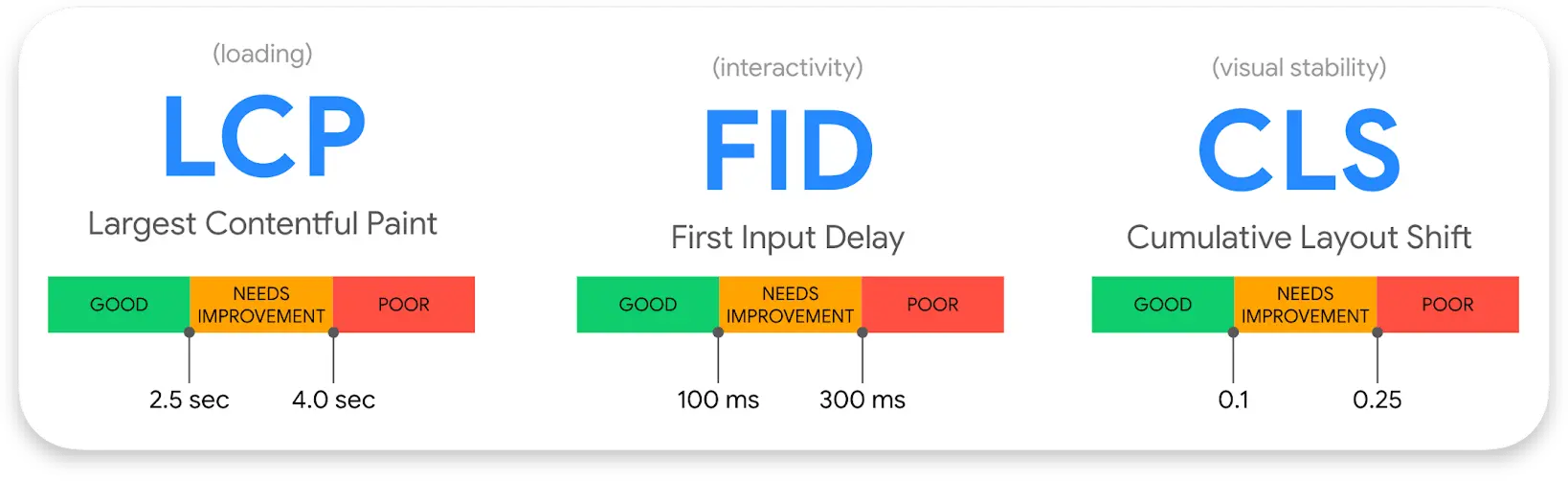
Introducing Web Vitals: essential metrics for a healthy site" by Philip Walton, via the Chromium Blog Licensed under CC BY 2.5
A slow website doesn't just frustrate the people who visit it. It can also affect whether they find you in the first place.
Google has been clear that relevant, high-quality content is still the most important ranking factor. But they've also said that when multiple pages offer similar content, their ranking systems reward pages that provide a better user experience. In a local market like Doylestown, where several businesses compete for the same searches, that tiebreaker matters.
This is why Google introduced Core Web Vitals in 2020 and began using them as a ranking signal in 2021. They measure three things:
Loading (Largest Contentful Paint): How long it takes for the main content on your page to appear. Think of it as the moment a visitor stops staring at a blank screen and actually sees something useful. Google's guidance is to keep LCP around 2.5 seconds or less when you can - the key is avoiding anything that drags load time past a few seconds.
Interactivity (Interaction to Next Paint): How quickly your site responds when someone taps a button, clicks a link, or types in a form. It's like flipping a light switch. If there's a noticeable delay before anything happens, that's a problem.
Visual Stability (Cumulative Layout Shift): Whether elements on the page move around unexpectedly. You know when you're about to tap a button and the whole page shifts so you click something else entirely? That's what this measures.
These metrics matter even more for local businesses. 84% of local searches happen on mobile, where load times tend to be slowest. Even more telling, 76% of people who search for a local business on their phone visit a store within 24 hours. These are people ready to spend money. If your site loads slowly and a competitor's doesn't, guess who shows up first.
What's Actually Slowing You Down
The good news is that most of the things that make a website slow are fixable. You don't need to understand code or server architecture. You just need to know what to look for.
1. Unoptimized Images
Images are one of the most common causes of slow load times, and they're also one of the easiest to fix. The basics: keep file sizes small, use modern formats like WebP or AVIF instead of older formats like PNG or JPEG, and make sure images below the fold (the part of the page you have to scroll to see) only load when a visitor gets to them. This technique is called lazy loading, and it makes a noticeable difference.
You can also use a CDN (Content Delivery Network) like Cloudinary or Cloudflare to automatically compress, resize, and optimize your images so they load faster without losing visible quality.
2. Slow Hosting
Your hosting is where your website lives, and it can quietly drag your performance down. A good way to check is to look at your Time to First Byte (TTFB). This measures how long it takes your server to send the very first piece of data back to a visitor's browser.
Here's a simple way to read your TTFB:
- Under 0.8 seconds: You're in good shape.
- Between 0.8 and 1.8 seconds: There's room for improvement.
- Over 1.8 seconds: Your hosting is a bottleneck and is likely hurting your performance.
Two ways to check:
- PageSpeed Insights: Enter your URL and look for the "Discover what your real users are experiencing" section. Your TTFB will be listed there.
- SpeedVitals: A simple tool that tests your TTFB directly.
3. Too Many Plugins and Bloated Builders
If your website runs on a platform like WordPress, heavy page builders and too many plugins are a common source of slowdowns. Many popular builders add layers of code that make the browser work much harder to display your page. On top of that, some plugins are "render-blocking," meaning they force the visible parts of your website to wait while background scripts finish downloading.
The fix starts with a plugin audit. Go through your list and remove anything you don't strictly need. If you're using a heavy page builder, consider switching to a lighter option like the built-in Gutenberg (Block) editor, which produces cleaner code. For the plugins you do keep, look into asset management tools that only load a plugin on the pages where it's actually needed.
4. No Mobile Optimization
In 2026, nearly 24% of the top million websites still aren't mobile friendly. That's one in four. And according to a 2025 marketing report, 17% of small business sites don't meet Google's mobile-friendly requirements at all, while 81% deliver "mediocre or poor" results on mobile devices.
Here's the number that ties it all together: mobile devices make up roughly 63% of all internet traffic. A site that doesn't work well on a phone doesn't work well for the majority of your visitors. And 57% of internet users say they won't recommend a business with a poorly designed mobile website.
The Bottom Line
Every one of these issues has a solution. Whether it's compressing your images, upgrading your hosting, cleaning up your plugins, or making your site work better on mobile, these are all problems you can fix. The important thing is knowing they exist. Once you do, you're already ahead of most of the competition.
What a Fast Website Actually Feels Like
Think about the last time you visited a website that just worked. You tapped a link and the page appeared instantly. The text was easy to read on your phone. The buttons were right where you expected them. You didn't think about the technology at all. You just found what you needed and took action.
That's what a fast, well-built website feels like to your customers. And nearly 70% of consumers say page speed directly affects whether they're willing to buy.
Now think about the opposite. A site that loads in chunks. Images that pop in late and push the text around. A button that moves right as you're about to tap it. Maybe the page takes so long you're staring at a white screen wondering if something is broken. That experience doesn't just annoy people. It makes them trust you less.
A fast website is the digital version of a clean, welcoming storefront on State Street. It tells your customers you care about their experience before they've spent a dollar. It says you're professional, you're current, and you respect their time.
What You Can Do Next
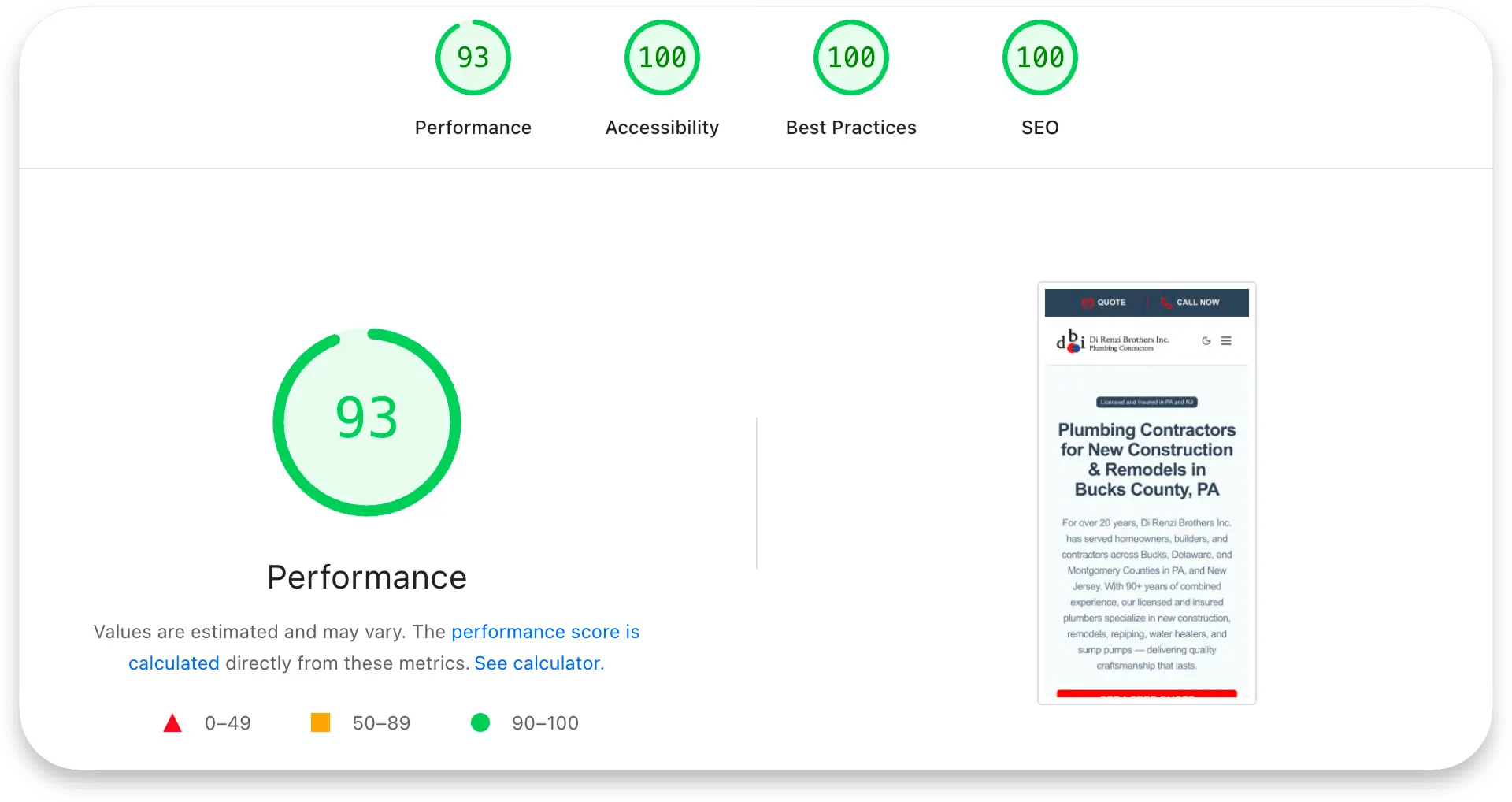
Website speed isn't a technical nice-to-have — it's the very first impression your business makes. Before a customer reads your story, sees your work, or picks up the phone, they're waiting for your site to load. In Doylestown, where reputation and word-of-mouth still carry real weight, that first impression matters just as much online as it does in person.
If you want to take matters into your own hands, start by running your site through Google's PageSpeed Insights. It's free and will show you exactly where you stand. Tooltester also put together a solid loading speed comparison of the most popular website builders if you're exploring a new platform.
And if you'd like a second set of eyes, OneUp Digital offers a free website roadmap — an honest look at where your site stands and what could make the biggest difference. It's yours to keep regardless of what you decide to do next. No pressure, no strings attached.